
Access and Credentials: Simplicity on the Surface


Most people interact with access control every day without giving it much thought. You present a badge, phone or biometric identifier. The door unlocks.
Behind that seemingly simple interaction is a layered system of technologies, communication methods and security decisions. These choices directly affect security posture, convenience and long-term system value. This guide explains how access control readers and credentials work together, why those pairings matter and what professionals should consider when planning for the future.
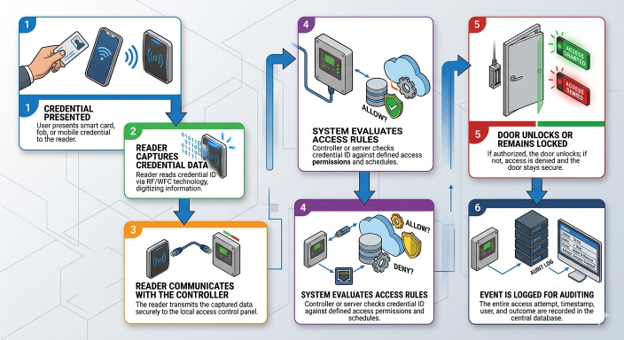
Access control feels simple to the end user, but every badge interaction relies on multiple technologies working together behind the scenes.
Readers: The Front Line
Readers are the physical interface between users and the access control system. Their primary role is to capture credential data and transmit it to a controller for a decision to be made. Readers vary widely in form factor, capability and security features.
Common reader form factors include wall-mounted readers, narrow mullion readers, long-range readers for vehicles and units that integrate keypads and/or biometric sensors. While form factor dictates where a reader should be installed, internal technology dictates how securely it operates.
Once a credential is presented, the reader must communicate that information to the access control controller. The method used has significant security implications.
Communication Protocols
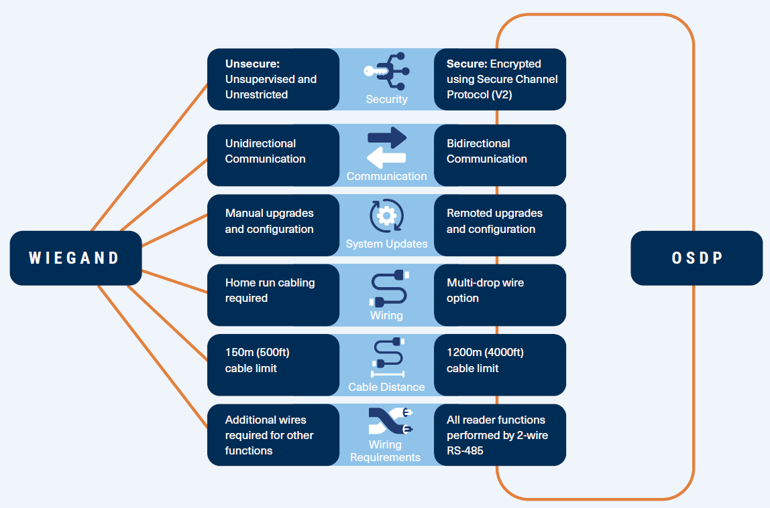
When it comes to reader-to-controller communication, two primary protocols dominate the industry: Wiegand and SIA Open Supervised Device Protocol (OSDP). These two protocols differ tremendously in terms of security, communication capabilities and adaptability to modern access control needs. The communication protocols are the backbone of any access control system. Choosing which will play a crucial role in security, reliability and scalability.
Wiegand
Legacy one-way signaling methods transmit credential data without encryption. These interfaces are widely supported and still deployed but offer little protection against interception or manipulation.
| Advantages | Disadvantages |
| Compatibility: Supported by almost all systems and devices, makes integrating legacy systems simpler | Lack of encryption: More vulnerable to tampering and breaches |
| Install Base: 50+ years as industry standard , most existing systems built on this infrastructure | One-way communication: Prevents device monitoring and remote configuration |
| Reliability: Known for a high fault tolerance | Limited cable distance: Connections limited to 500’ |
OSDP
Modern secure protocols use encrypted, bidirectional communication operating over RS-485 serial connections. These methods enable device authentication, encrypted data transfer, remote configuration, health monitoring and tamper detection. Initially introduced in 2008 and continuously enhanced by an active working group to address a need for more secure and effective communication.
| Advantages | Disadvantages |
| Enhanced Security: AES128 encryption protection against data being intercepted. | Complex implementation: Additional configuration steps that involve more commissioning at installation |
| Bidirectional communication: Allows real-time status updates, remote configuration and maintenance | Limited compatibility: Legacy systems may not support OSDP and require upgrades |
| Interoperability: Seamless compatibility with many manufacturers’ devices | More Expensive: Higher upfront costs on devices, often offset by lower wiring costs and long-term maintenance |
| Scalability: Supports longer cable runs and more complex data exchanges; ideal for large deployments | |
| Multidrop Functionality: Multiple devices share RS-485 bus, reducing wiring and install costs |
Key Consideration: A secure credential paired with an unencrypted reader interface may lose much of its intended security.
Credentials: More Than Just a Badge
Credentials are how users prove their identity to the system. While all credentials serve the same purpose, they differ significantly in security, convenience and life-cycle management.
Common credential formats include physical cards, key fobs, mobile credentials stored on smartphones, biometric identifiers and PIN codes. Each format brings different operational and security tradeoffs.
Credential Technology Categories
Not all credentials are created equal.
Low-frequency proximity credentials:
- 125 kHz, typically use a fixed identifier and offer minimal protection against cloning.
- Best for: Small businesses, offices and buildings with basic access control requirements
High-frequency smart credentials:
- 13.56 MHz support secure authentication methods often using embedded microchips and protected data storage, making them more resistant to duplication and misuse
- Best for: Education settings, corporate offices and secure facilities
Mobile credentials reside on personal devices and can use technologies such as near-field communication or secure Bluetooth. These credentials can support remote issuance and revocation, improving operational efficiency.
Biometric credentials rely on a physical trait instead of something a user carries. They are often combined with another factor to balance security and reliability. PIN codes are something that you know. A memorized number that is entered on a keypad. They are often combined with another factor to balance security and reliability.
Credential Formatting
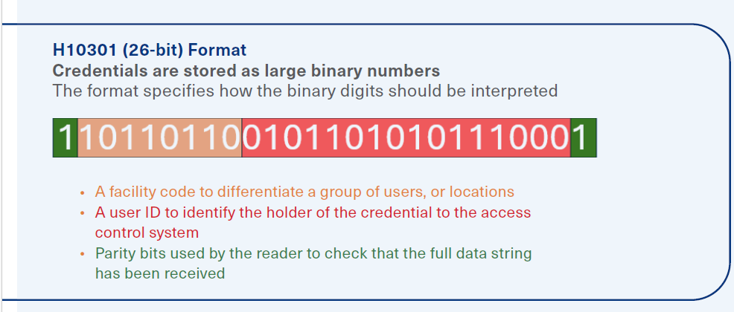
Credential formats play a crucial role in access control systems, defining how identity data is structured and interpreted by readers and access control panels. Typically, the credential data consists of an ID number, and in many cases, additional information (like the facility code and parity checking bits) that is used by the access control system to identify a user, or differentiate between groups of users, or physical locations. The chosen format determines data capacity, credential validation methods and overall security against duplication. Credential formats vary in bit length, fields, and structure, affecting how much information can be stored. Since credentials are processed in binary (0s and 1s), the bit length determines the number of possible unique credentials. Longer bit lengths allow for larger ID ranges and greater flexibility in assigning credentials
The standard 26-bit format is an open format, widely-used industry standard. An open format means that anyone can buy cards in a specific format and that specific format description is publicly available. The longer the bit length, the more combinations there are available to avoid ID overlap or duplication.
The facility code or site code acts like an area code in a telephone number, indicating which site that card belongs to and where it can be used.
Pairing Is Critical
Readers and credentials should never be evaluated independently. The overall security of an access control system depends on how these components are paired.
For example, advanced credentials connected to a controller using legacy interfaces may offer little added protection. Likewise, modern readers connected to outdated systems may not support advanced features.
Balancing Security and Convenience
Every access control decision involves tradeoffs. Higher security often introduces friction, while convenience can introduce risk. Security considerations include resistance to cloning, protection against interception attacks and device authentication. Convenience considerations include speed of access, ease of replacement and support for visitors or temporary users.
Access control systems are long term investments that often remain in place for a decade or more. Key planning factors include scalability, support for open standards, interoperability between components and the ability to adopt new credential types without replacing existing infrastructure.
Access badges and readers are designed to blend in to their surroundings when they work correctly, but their underlying technology choices have lasting impact. Understanding the layers beneath the badge tap helps security professionals design systems that balance protection, usability and future readiness.
The views and opinions expressed in guest posts and/or profiles are those of the authors or sources and do not necessarily reflect the official policy or position of the Security Industry Association.
This article originally appeared as a RISE Resource from the SIA RISE community for young security professionals.
 Back to Top